Overview

One place. Every Monday. Total clarity.

Most founders start their week by opening five different tools, checking Slack, digging through emails, and trying to reconstruct what needs attention. The Executive Dashboard eliminates that entirely.

Every Monday morning, a clean, structured brief lands in the founder's inbox — or is ready in Notion — covering everything relevant to the week ahead. No hunting. No guessing. Just clarity.

What This Replaces

Scattered morning context-building across Slack, email, ClickUp, and Google Calendar. Instead, everything is synthesized into one organized document — ready before the founder starts their day.

Sections in Dashboard
6
Time to Prepare
30 min
Time to Review
5–10 min
Dashboard Structure

What every weekly brief includes

1
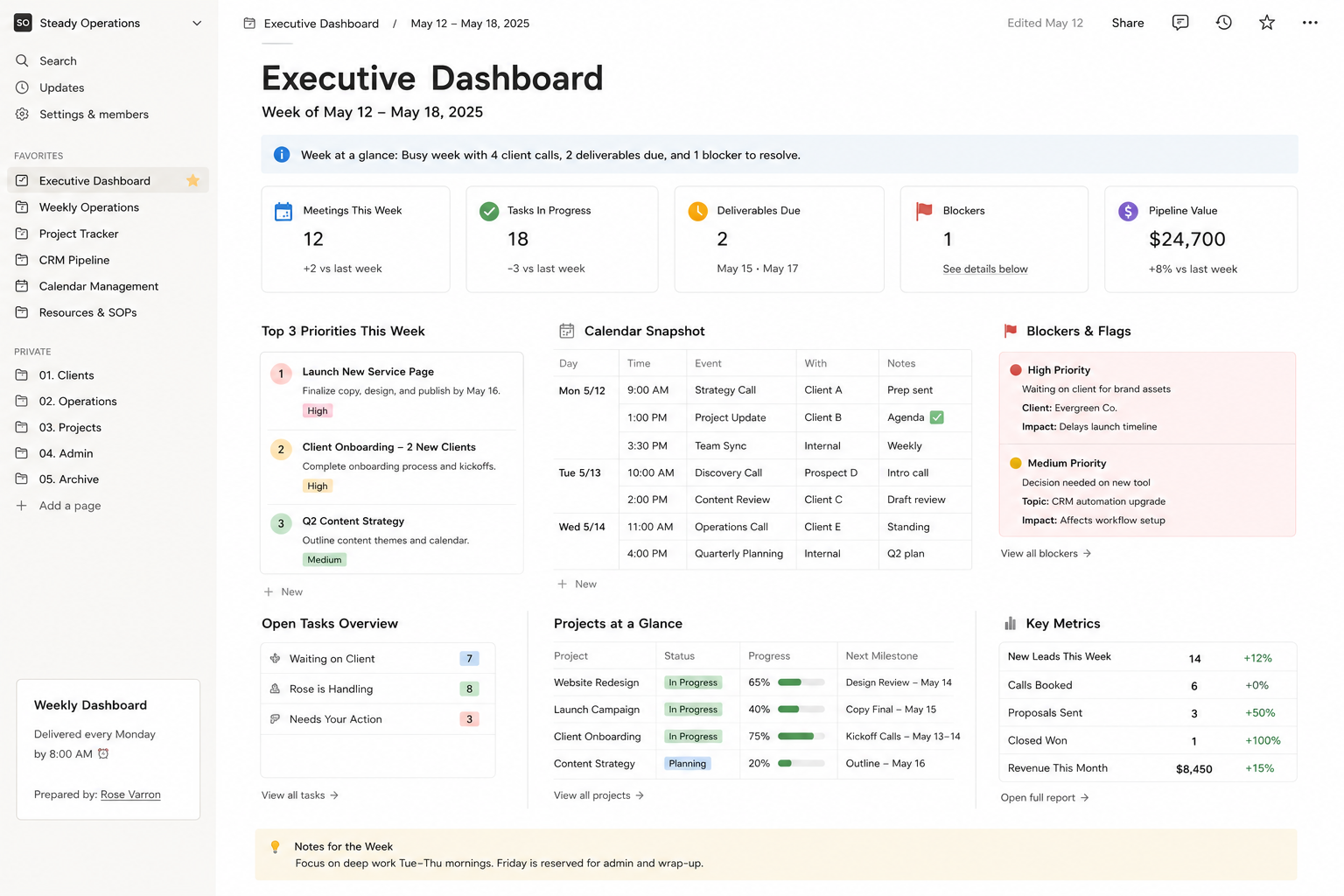
Week Header — Date, status, tone
Week number, date range, one-line status summary (e.g. "Busy week — 4 calls, 2 deliverables due, 1 blocker to resolve"). Sets context immediately.
2
Top 3 Priorities This Week
Founder's most important outcomes — not a task list. What needs to move? What needs a decision? What must not fall through?
3
Calendar Snapshot
All meetings listed by day with time, attendee, and prep note. Flags any conflicts, back-to-back blocks, or missing agendas.
4
Open Tasks & Delegated Items
Everything currently in flight — by project or category. Items waiting on client vs. items Rose is handling vs. items needing founder action today.
5
Blockers & Decisions Needed
Items where progress is stuck and founder input is required. Clearly labeled with context and a suggested next step to make decision-making fast.
6
Key Metrics (if applicable)
Pipeline updates, revenue-adjacent numbers, or operational KPIs relevant to the founder's focus. Sourced from CRM, analytics, or reporting tools.
Executive dashboard screenshot
Dashboard Screenshot — Notion or Google Docs View
Weekly Priorities

How priorities are set and tracked

Each week, Rose reviews outstanding projects, upcoming deadlines, and founder-flagged items to surface the three most important outcomes for the week. This isn't a task list — it's a focus filter.

Sample Priority Format

Priority 1: Finalize and send revised proposal to Client X — due Wednesday.
Priority 2: Decision needed on onboarding tool migration — blocking 2 other tasks.
Priority 3: Review and approve Q2 content calendar — ready for your sign-off.
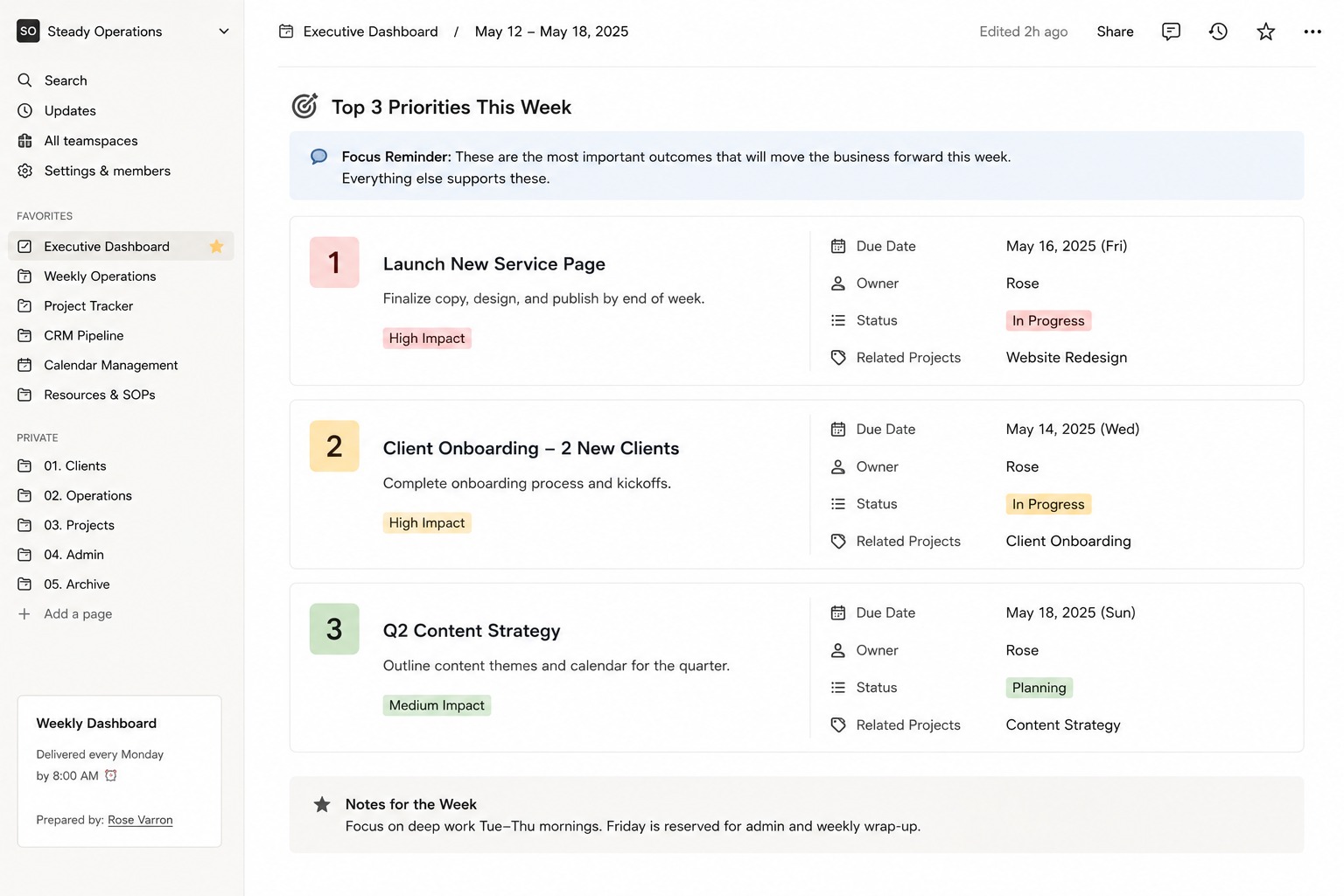
Weekly priorities section screenshot
Weekly Priorities Section Screenshot
Key Metrics

What gets measured, gets managed

Metrics tracked depend on the founder's business focus. Below is a typical set for a service-based founder — customized during onboarding.

Metric Source Frequency Owner
Active clients CRM / HubSpot Weekly Rose
Open proposals CRM pipeline Weekly Rose
Follow-ups overdue ClickUp / CRM Weekly Rose
Tasks completed vs. planned ClickUp Weekly Rose
Revenue this month (if tracked) QuickBooks / Stripe Monthly Founder
Blockers & Flags

Nothing gets buried

Blockers are surfaced clearly, with context, so founders can make fast decisions without needing the full backstory. Every blocker includes: what's stuck, why, what's needed, and a suggested resolution.

Sample Blocker Entry

🔴 Blocker: Client X onboarding delayed
Waiting on tool access — requested twice, last follow-up sent Friday. If no response by Tuesday, recommend a direct call. I'll draft the follow-up message for your approval.
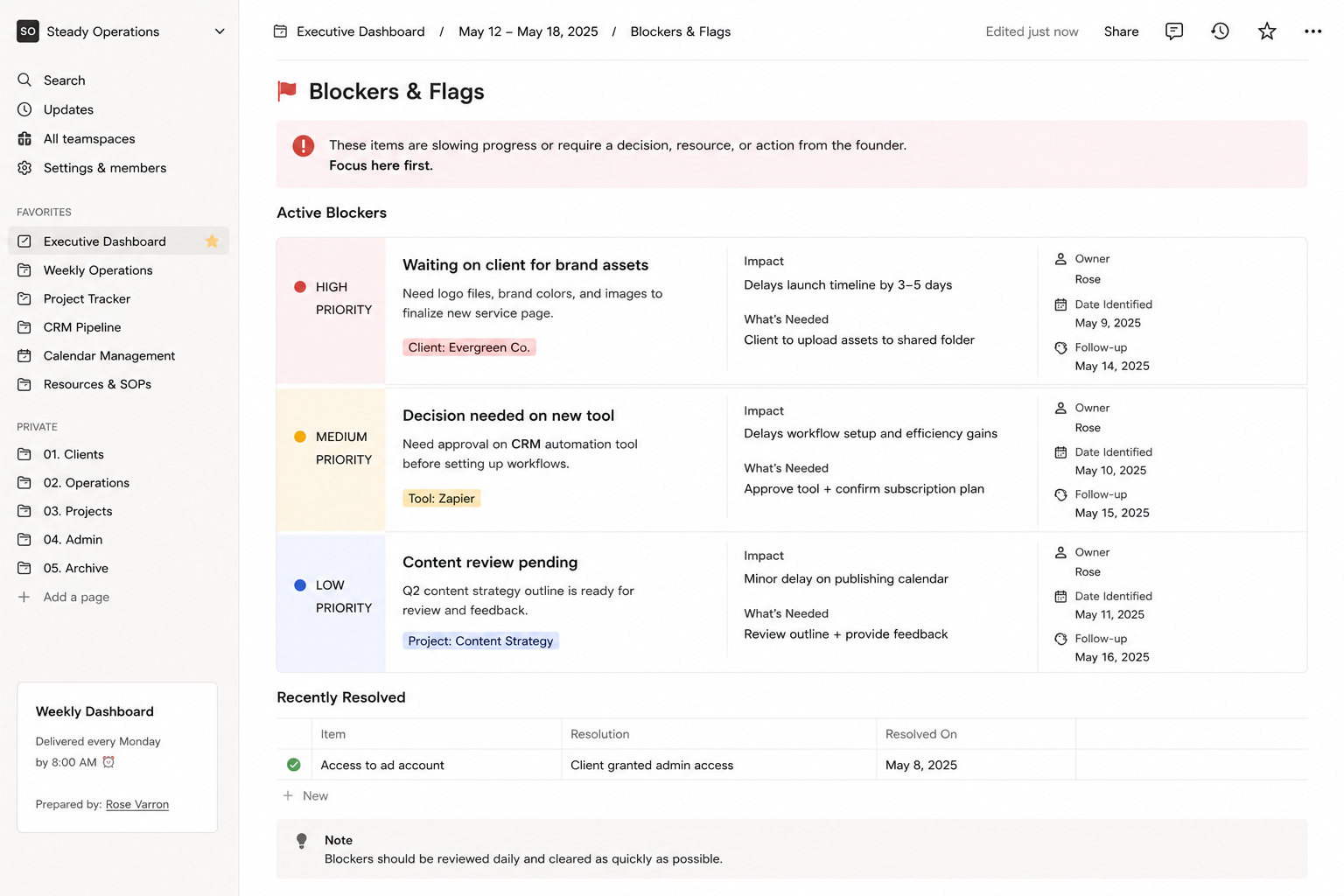
Blockers section screenshot
Blockers Section Screenshot
Delivery System

How the dashboard gets to the founder

Friday · 4 PM
Rose begins weekly brief prep
Reviews ClickUp, CRM, calendar, and any open items. Pulls metrics. Identifies blockers. Drafts priorities based on what's in motion.
Friday · 5 PM
Brief completed and saved
Dashboard is finalized in Notion (or Google Doc). Filed under the correct week in the founder's shared workspace.
Monday · 8 AM
Brief delivered to founder
Slack message or email with link to the weekly brief. One-line summary of what matters most this week. Ready before the founder's planning block.
Monday · 8:30 AM
Founder reviews during planning block
5–10 minute read. Any flags or decisions are responded to in Slack. Rose executes on confirmed priorities immediately.